Struggling Taiwanese smartphone manufacturer HTC is seeking ways to expand its business — as CEO Peter Chou and chairwoman Cher Wang hint in a Financial Times interview at plans for a tablet and a wearable device.
Chou says that HTC worked with Microsoft on a smartwatch several years ago — though which smartwatch this refers to isn’t clear at all. Microsoft previously made a smartwatch in 2004 that it eventually pulled the plug on in 2008.
Chou is evasive on when HTC might try to make a smartwatch again, though he tells the FT that the wearable technology market — though “a critical segment” for HTC — is still in its early stages and it may be premature for the company to make inroads into the market.
On the subject of a tablet, Wang promises it will be “nice and disruptive” when it makes its appearance.
Dell introduced us to its Venue 8 Pro Windows 8.1 tablet and Haswell refresh of the XPS 15 earlier this month, and starting today both products -- along with two Venue Android slates -- are available online. The Venue 8 Pro, you may recall, offers an 1,280 x 800 IPS display, an Atom processor and an optional Synaptics digitizer. That model will go for $300 and up, while the pen costs an extra $35. Meanwhile, Dell's answer to the Surface Pro 2, the Venue Pro 11, will ship in November.
The latest XPS 15, available with a 3,200 x 1,800 IPS display and up to a Core i7 Haswell CPU, starts at $1,500 for a full HD panel and $1,900 for the more pixel-dense version. Finally, the budget-priced Dell Venue 7 and 8 tablets, both of which run Android 4.2, are also available today. As previously reported, these guys will set you back $150 or $180, respectively. Head to Dell's website to view all the configuration options.(
EG/SG)
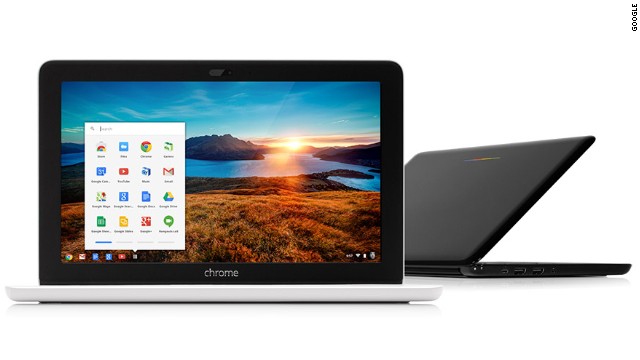
HP and Google have rolled out an intriguing Chromebook today -- the 11-inch HP Chromebook 11.
Chromebooks, as you may recall, run Google's web-centric Chrome Operating System consisting mainly of a web browser and promising simplicity and security.
If you spend all your time in a web browser and don't want to spend much on a typical computer, a Chromebook would be worth a closer look. I've used several of them, I own one for quick tasks, my mom has one, Jared has one, Harry's mom has one. You get the idea. They make for good secondary machines or as main machines for basic web browsing.
There's been a tradeoff between price -- Chromebooks start at around $200 -- and specs, but HP's latest offering sets it apart from earlier Chromebooks in a few ways.
For starters, while many other cheap Chromebooks feature so-so screens, HP's model sports a nice-ish IPS (in-plane switching) screen for better viewing angles and more vivid color reproduction.
Second, the Chromebook can be charged with a micro-USB cable -- the same kind used for most non-Apple smartphones. If you've a got an Android phone, for instance, you could get away with packing a single charger before you leave the house. And finally, there will be a model available later this year with a built-in 4G/LTE cellular connection.
With the exception of the $1,300-and-up Chromebook Pixel, previous Chromebooks have only had a cellular option that used aging 3G networks.
Design-wise, the HP Chromebook 11 sports similar internal specs to an earlier $250 Samsung model; both feature a mobile processor more commonly found in smartphones and tablets than portable computers.
The idea is to offer better battery life, but there's an associated performance tradeoff. The machine has a 16-gigabyte solid state drive, two gigabytes of memory and HP claims battery life will last up to six hours. Weight is 2.3 pounds.
HP's Chromebook is available now in a Wi-Fi-only version for $279. The 4G/LTE model will be available later this year. That's the one I'm most interested in for use a mobile reporting computer. Hopefully the price is right and the cellular data plan options aren't too outrageous.
Once Intel shows off an unannounced tablet at one of its press events, the jig is up: the product may as well be official at that point. That's what happened with Acer's Iconia W4 Windows 8.1 tablet, which recently surfaced in public, but wasn't officially announced until today. As the successor to the W3, this is Acer's second 8-inch tablet, and it corrects many of the shortcomings that doomed the original. Chiefly, it steps up to a 1,280 x 800, optically bonded IPS display, so you should notice less glare, even in harsh conditions. (Take a look at our outdoor hands-on shots if you're skeptical.)
Additionally, as rumored, the W4 packs a faster Atom processor -- specifically, one of the chips from Intel's new Bay Trail series. Though we only had a few moments of hands-on time, we noticed some brisk transitions between menus and apps, and programs were quick to launch as well. If ever we pressed the Start button, for instance, the tablet wasted no time in switching back to the Start Menu, or to the desktop. In terms of the exterior hardware, the tablet is slightly lighter (0.91 pounds instead of 1.1) and thinner, too (0.42 inch versus 0.45). Also, whereas the W3 had 2-megapixel cameras on both the front and the rear, the W4 rocks a 5MP main shooter (the front webcam is still 2MP). Rounding out the list, the W4 keeps the same basic ports as the W3 -- namely, micro-USB, micro-HDMI and a microSD slot. And, as before, you can use it with an optional keyboard. Look for it this month, starting at $330 with 32GB of built-in storage and $380 for the 64GB model. (ENG/SG)